Free download. No sign-up, no email.
Download Excel (.xlsx)21 KBWho this template is for
- Owners comparing loan offers
- Business plan writers
- Equipment and vehicle buyers
How to fill it in
- Enter the loan amount.
- Enter the annual interest rate.
- Enter the term in years.
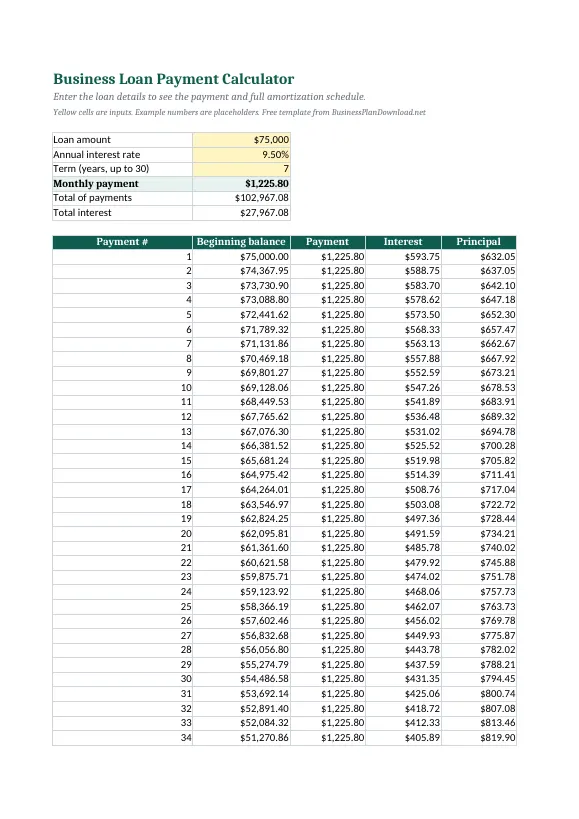
- Read the monthly payment and total interest.
- Use the schedule for principal and interest by month.
What is inside
- Sheet: Loan Calculator
- Loan amount
- Annual interest rate
- Term (years, up to 30)
- Monthly payment
- Total of payments
- Total interest
- Payment #
Writing a full business plan?
Browse 39 free sample plans by industry, each with startup costs and projections.
Frequently asked questions
How is a loan payment calculated?
It uses the standard amortization formula, which spreads principal and interest into equal monthly payments over the term.
Can I use this for SBA loans?
Yes, for fixed-rate estimates. Variable rates and fees will change the actual payment.
Is this business loan payment calculator free to use?
Yes. Download it, edit it and use it for your own business at no cost. No account or email address is required.
Related templates
Excel
Pricing Calculator Template
Set prices from cost and target margin.
Excel3-Year Financial Projections Template
Projected P&L and cash flow from simple assumptions.
ExcelStartup Costs Calculator
Add up one-time and monthly costs to open.
Word & PDFCompetitive Analysis Template
Compare competitors side by side.